




MICRO DEGREE
Power BI
Become a professional Power BI Developer in just 4 weeks

100% LIVE Interactive Classes
Become a professional Power BI Developer in just 4 weeks
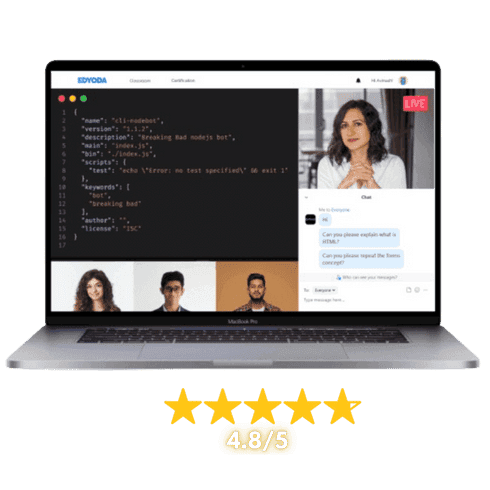
100% LIVE Interactive Classes

Reserve your spot today!
Basic Info
Select Offers
Application closes on:28 Sep 2026
Get instant access of pre-course material!
Talk to Us
We’re here to help! Reach us at:
What is in it for you?

 100% Live Classes
Instructor-led Live Sessions
Attend 4 weeks of instructor led live classes from the top 1% industry experts


Projects & Case Studies
Projects & Case Studies
Gain hands-on experience with projects and real-world case studies for impactful learning.

Verified Certificate
Verified Certificate
Earn a industry recognized certificate and kick start your career

Session Recordings
Session Recordings
Revisit older chapters anytime with recorded sessions

Flexible Schedule
Flexible Schedule
Choose live classes from different cohorts that fit your availability.

Hands-on Lab Access
Hands-on Lab Access
Students get access to labs to practice their learnings
 100% Moneyback Guarantee
Grab your slot before the offer expires
Reserve your spot today!
Basic Info
Select Offers
Application closes on:28 Sep 2026
Get instant access of pre-course material!
Talk to Us
We’re here to help! Reach us at:
Learn from Top 1%
Sr. Managers, VPs, CXOs, Directors & Founders from companies shaping the future.

Combo Offers
Create Your Own Combo
100% Moneyback Guarantee
Available in 4 monthly installments at $24/month
Reserve your spot today!
Curriculum
Duration: 4 weeks
Max Batch Size: 15 persons
Live Sessions Schedule  Sat - Sun (Weekends Only)
  Timing 7:00 AM - 9:00 AM / 8:30 AM - 10:30 AM / 11:00 AM - 1:00 PM / 5:00 PM - 7:00 PM / 7:30 PM - 9:30 PM EST

- Introduction to Business Intelligence (BI)
- BI Architecture and Data Flow Concepts
- Overview of Power BI Ecosystem
- Power BI Components (Desktop, Service, Mobile, Gateway)
- Power BI Licensing and Pricing Models
- Power BI vs Tableau vs QlikView
Mentors

12+ Years, Sr Analyst Manager, Tiger Analytics


15+ Years, Sr. Manager, Deloitte


18+ Years, Sr. Architect, Microsoft

Course Includes

LIVE Interactive Sessions

Quizzes, Assignments & Projects

Study Materials & Session Recordings

Lab Access

Certificate
Tools Covered

Course Includes
LIVE Interactive Sessions
Quizzes, Assignments & Projects
Study Materials & Session Recordings
Lab Access
Certificate
Course Pre-requisites
.ffb97545.png&w=16&q=75&dpl=dpl_E1PtQqXxQDoAKw2ai9sYBi6aXRQ8) Basic computer literacy and familiarity with file management (Excel, CSV files)
Basic computer literacy and familiarity with file management (Excel, CSV files)- Fundamental understanding of data concepts such as tables, rows, and columns
- Access to a Windows computer capable of running Power BI Desktop
Outcomes
- Build a complete understanding of Business Intelligence architecture and the Power BI ecosystem
- Extract and connect data from multiple sources including Excel, SQL Server, and web services
- Transform and clean raw data using Power Query Editor techniques such as merging, appending, and pivoting
- Design optimized data models using star schema and snowflake schema with proper relationships and cardinality
- Implement DAX calculations including measures, calculated columns, and time intelligence functions
- Create interactive reports and dashboards with drill-down, drill-through, slicers, and custom tooltips
- Analyse data using advanced analytics features and optimize Power BI report performance
- Publish, share, and manage Power BI reports across workspaces with proper security and governance
Projects You Will Build
Practical, enterprise-grade projects that reflect real industry challenges
Retail Sales Performance Dashboard
Connect to multiple data sources (Excel, CSV, SQL Server) to build a comprehensive retail sales dashboard. Apply Power Query transformations to clean and merge datasets, create a star schema data model, and implement DAX measures for YTD sales, cumulative totals, and rankings across product categories and regions.
Financial KPI Reporting Solution
Design an interactive financial reporting dashboard for a mid-size company that tracks revenue, expenses, and profitability metrics. Leverage time intelligence DAX functions (YTD, QTD, MTD), drill-through pages for detailed analysis, and dynamic slicers to enable decision-makers to explore data across fiscal periods and departments.
HR Workforce Analytics Dashboard
Build a workforce analytics solution by extracting employee data from multiple sources and transforming it using Power Query. Create data models with date tables and calculated columns, design interactive visualizations with hierarchies and conditional formatting, and publish the report to Power BI Service with role-level security.

for successfully completing the 'Power BI' course conducted from 30 Aug 2026 to 27 Sep 2026
Add a Industry Recognized
Certificate To Your Resume
Industry Recognized
Certificate
Learn the best from the best

Career Advancements
Elevate your career with a respected certificate
Industry Respect
Gain credibility in the field
Networking
Connect with experts and peers
Opportunities
Attract exciting job prospects and promotions

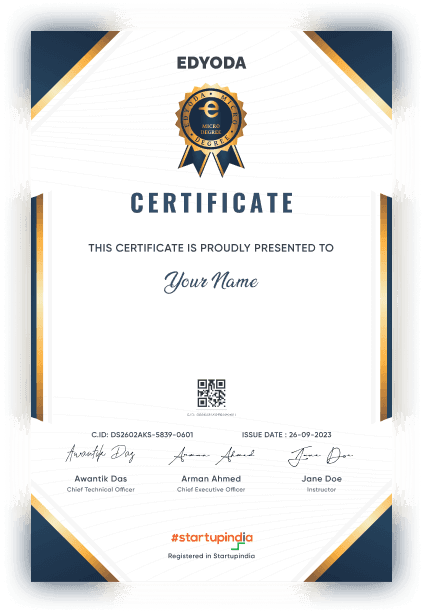
for successfully completing the 'Power BI' course conducted from 30 Aug 2026 to 27 Sep 2026

100% Moneyback Guarantee
Top 1% Recruiters - Get interview access to 550+ Companies

Frequently Asked Questions
Everything you need to know about the course
No advanced experience is required. The course starts with BI fundamentals and walks you through the entire Power BI ecosystem. However, basic familiarity with spreadsheets (Excel) and general data concepts like tables and columns will help you get up to speed quickly.
The curriculum covers Business Intelligence concepts, the Power BI ecosystem, data extraction from files and databases, data transformation with Power Query, data modeling (star/snowflake schema), DAX fundamentals including time intelligence functions, interactive report and dashboard design, advanced analytics features, and publishing/sharing reports via Power BI Service.
Plan for approximately 8-10 hours per week over the 4-week duration. This includes watching instructional content, completing hands-on exercises in Power BI Desktop, and working on the capstone projects that reinforce each module's concepts.
You will work extensively in Power BI Desktop throughout the course. Hands-on activities include connecting to real data sources (Excel, CSV, SQL Server), cleaning and transforming data in Power Query, building data models, writing DAX formulas, and designing interactive dashboards with slicers, drill-through pages, and custom visuals.
This course prepares you for roles such as Business Analyst, Data Analyst, Business Intelligence Analyst, and Power BI Developer. You will build a portfolio of industry-relevant projects and gain practical skills in data modeling, DAX, and visualization that are highly sought after by employers across industries.
The primary tools include Power BI Desktop for report creation and data modeling, Power Query Editor for data transformation, DAX (Data Analysis Expressions) for calculations, Power BI Service for publishing and collaboration, and connections to data sources such as Excel, CSV, SQL Server, and Azure SQL Database.
The Micro Degree course is an online LIVE course, where LIVE sessions will be conducted online on our Classroom platform. Prior to the start of the course, you'll receive preparatory material in the form of recorded content which can be access on the same platform.
In this course instructors will use English language for teaching.
Upon successful registration, you will receive a confirmation email on your registered email ID. In this email you will receive login details for your newly created account on the Edyoda Classroom platform (https://classroom.edyoda.com). Additionally, you will receive a PDF guide containing step-by-step instructions on how to utilize the platform to access live sessions and learning materials.
Our instructors are the industry experts with a minimum working experience of 10 years with a strong technical and teaching background. They bring industry knowledge and practical expertise to the course.
Yes, the course includes online assignments, quizzes, and a final project to reinforce your learning and assess your proficiency in Power BI.
Yes, you can interact with instructors and fellow students through discussion forums, live Q&A sessions. We encourage a supportive learning community.
Yes, hands-on lab access is available at an additional cost, typically around ₹2,750 (or $30 for international learners) per year. This is the standard rate for most tracks, though specialized labs such as Data and Security may be priced differently. Beyond just practicing what you learn, the labs let you host and showcase your projects live, so you can share your work on social media or present it directly to recruiters as part of your portfolio.
We offer a 100% money-back guarantee to ensure your complete satisfaction. If you're not satisfied, you can request a full refund within 3 days of purchase or before the second session, whichever comes earlier. Simply contact our support team(support@edyoda.com) with your purchase details, such as the order ID or email address, and share your reason for the refund. Requests made after 3 days or after the second session will not be eligible for a refund. There are no hidden charges, you will receive the full amount paid. Refunds are processed within 7–10 business days and credited back to your original payment method.
Recommendations




